
How to Convert a Hand-Drawn Sketch Into a Floor Plan
The three ways to turn a hand-drawn sketch into a professional floor plan — DIY software, AI tracing and a done-for-you redraw service — and how to choose.
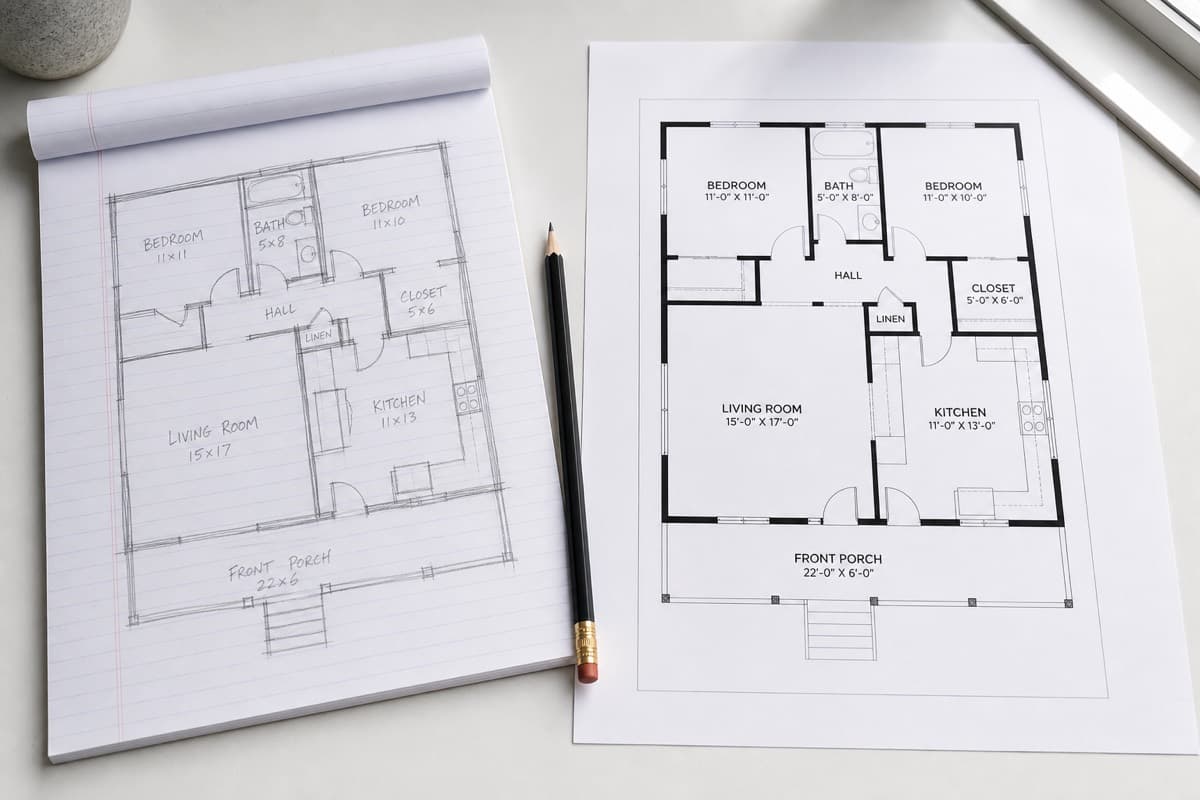
How do you convert a hand-drawn sketch into a floor plan?
To convert a hand-drawn sketch into a floor plan you can draw it yourself in floor plan software, use an app that traces your drawing automatically, or send it to a service that redraws it for you. The simplest and most reliable option is a redraw service: you upload a photo of your sketch and your measurements, and a professional returns a clean, scaled plan.
Key takeaways
- There are three routes — DIY software, automatic tracing, or a redraw service.
- DIY software is cheapest but has a learning curve and takes time.
- Automatic tracing is fast but results vary and need checking.
- A redraw service is the easiest, most consistent route for a professional result.
- Whichever you choose, the final plan depends on the measurements you provide.
You have a sketch of a property and a set of measurements. How do you turn that into a clean, professional floor plan you can put on a listing or send to an architect? There are three realistic routes. Here is how each works, with the trade-offs.
Ready to turn your sketch into a floor plan?
Upload your hand-drawn sketch and measurements and our team will redraw them into a clean, professional floor plan — ready for listings, brochures and marketing.
Option 1: Draw it yourself in software
Floor plan software (from free web tools to professional CAD) lets you recreate your sketch on screen. You place walls, doors and windows and type in your measurements.
Pros
- No service fee
- Full control over the result
- Useful if you draw plans regularly
Cons
- A learning curve, especially for CAD
- Time-consuming for a one-off plan
- Easy to produce something that looks amateur
This route suits people who will draw many plans and do not mind investing time up front. For a single plan, it is rarely the fastest option.
Option 2: Automatic tracing apps
Some apps try to convert a photo of your sketch into a plan automatically, or let you "walk" a room with your phone's camera or LiDAR sensor.
Pros
- Very fast for simple rooms
- No drawing skill needed
Cons
- Struggles with messy or unusual sketches
- Handwriting and labels are often misread
- Output usually needs manual cleanup
- Accuracy varies room to room
Automatic tools are improving, but for anything beyond a simple rectangular room they tend to need correcting — which defeats the time saving.
Option 3: A done-for-you redraw service
This is what Sketchplan does. You sketch and measure the property, upload a photo of your sketch and your notes, and a person redraws it into a clean, professional plan.
Pros
- No software to learn
- Consistent, professional output
- A human checks your sketch for sense
- One amendment round included
- Fast turnaround
Cons
- A per-plan fee (lower with an account)
- You still need to measure the property
For most people — estate agents, landlords, homeowners and photographers — this is the simplest path to a plan that actually looks professional.
How the redraw process works
- Sketch and measure the property (see how to sketch a floor plan and what measurements you need).
- Upload a photo of your sketch and measurements to the app.
- We redraw it into a scaled, labelled, CAD-style plan.
- You receive the finished plan as a JPG, PNG or PDF. One amendment round is included.
A note on accuracy
Whichever route you choose, the finished plan reflects the measurements that go in. Neither software nor a redraw service can invent a dimension you did not record — so measure carefully and note everything clearly. Do that, and the result will closely match the real property.
Ready to turn your sketch into a floor plan?
Upload your hand-drawn sketch and measurements and our team will redraw them into a clean, professional floor plan — ready for listings, brochures and marketing.
- #convert sketch to floor plan
- #hand drawn floor plan to CAD
- #sketch to floor plan
Frequently asked questions

The Sketchplan Team
Floor Plan Specialists
The Sketchplan team redraws hand-drawn sketches and measured notes into clean, professional CAD-style floor plans for estate agents, landlords, homeowners and property photographers across the UK.
Ready to turn your sketch into a floor plan?
Upload your hand-drawn sketch and measurements and our team will redraw them into a clean, professional floor plan — ready for listings, brochures and marketing.
Order on sketchplan.rehub.studio · see how it works
Keep reading
Related guides

Floor Plans for HMO and Room Lets
How landlords and agents use floor plans for HMO licensing, room-by-room marketing and inventories — and how to produce one from a sketch.

How Estate Agents Get Floor Plans Without a Surveyor Visit
How UK estate agents produce listing-ready floor plans without booking a measured survey — sketch at the viewing, measure carefully, redraw remotely.
How to Label Rooms and Dimensions for Portal Listings
Practical rules for room names, dimensions and abbreviations on marketing floor plans so Rightmove and Zoopla listings stay clear and consistent.